

Comments
Last updated: July 3, 2026
Imagine running a clothing store with a coworker. While you are registering the "Stainless Tumbler 500ml" product, situations come up that you cannot settle on your own. You may want to ask your coworker things like "Is this price of 18,000 won final?" or "Can I put it up early, before the sale starts?". Instead of asking separately over a messenger or email, you leave a note right on that tumbler product's screen. That is what a comment is.
A comment is a short note that the people working on the same product exchange with one another. If you write "Is this price final?" next to the tumbler product, a coworker in the same workspace (Space) can reply right there. Because what was discussed about a given product stays on that product's screen, another coworker who looks at it later can immediately grasp the context.
This page first looks at what a comment is, then covers how to leave a comment on the tumbler product (Content) and reply to it.
A work note that stays beside the product
A comment is a note attached to a resource. Here, a resource means things you handle in the content studio, such as a product (Content), a photo (Media), or a product template (Content Type). If you leave a comment on the tumbler product, that note stays inside the tumbler product's screen. When you move to another product's screen, you only see the comments attached to that product.
Along with the text, a comment automatically records who wrote it and when. If you write "Is this price final?" on the tumbler, the author's name and the time of writing are kept right next to it. So you do not need to separately check "Who asked this question?".
Here is what to keep in mind when working with comments.
- Comments can be attached to products, photos, and product templates. You can leave a note in the same way not only on the tumbler product (Content), but also on a tumbler product photo (Media) or on the "Product" template (Content Type) itself.
- Replies keep a conversation going. If you reply to a comment, that reply is shown grouped under the original comment. If you reply "Yes, it is final" under the comment "Is this price final?", they appear as one group.
- The length of a single comment is fixed. A comment can be from 1 character at minimum up to 500 characters at maximum. It is suited to exchanging short notes and replies rather than long discussions.
Internal communication that does not go outside
The most important point about comments is that a comment is internal communication visible only inside the content studio. The comment "Is this price final?" left on the tumbler is seen only among coworkers in the same workspace. It is never delivered to a customer who visits the actual store.
It helps not to confuse this with the product information itself. The tumbler's product name, price, and detailed description are information that, once you Publish them, is delivered to the external store and shown to customers. A comment, on the other hand, is a work note exchanged among the people building that product, so it does not go outside whether you publish or not. There is no publishing step for it at all.
So you do not write product descriptions meant for customers in the comment area. Write the tumbler description that customers will see in the detailed description field on the product authoring screen, and leave only discussions among workers, such as "Is this wording okay as is?", as comments. How to write and publish a Content's product information is covered in Writing and Publishing Content.
How it differs from a Tag
Because both are attached to the same product, a comment can be confused with a Tag, but the two play different roles. A Tag is a label that classifies a product. If you attach a "Bestseller" Tag, you can pull up only the products in that group at once. A comment, on the other hand, is a conversation exchanged between people. The comment "Is this price final?" does not classify the product; it only records the discussion held about that product.
To put it in one sentence, a Tag is a label that records "which group this product belongs to," and a comment is a note that records "what we discussed about this product."
Leaving a comment on the tumbler product
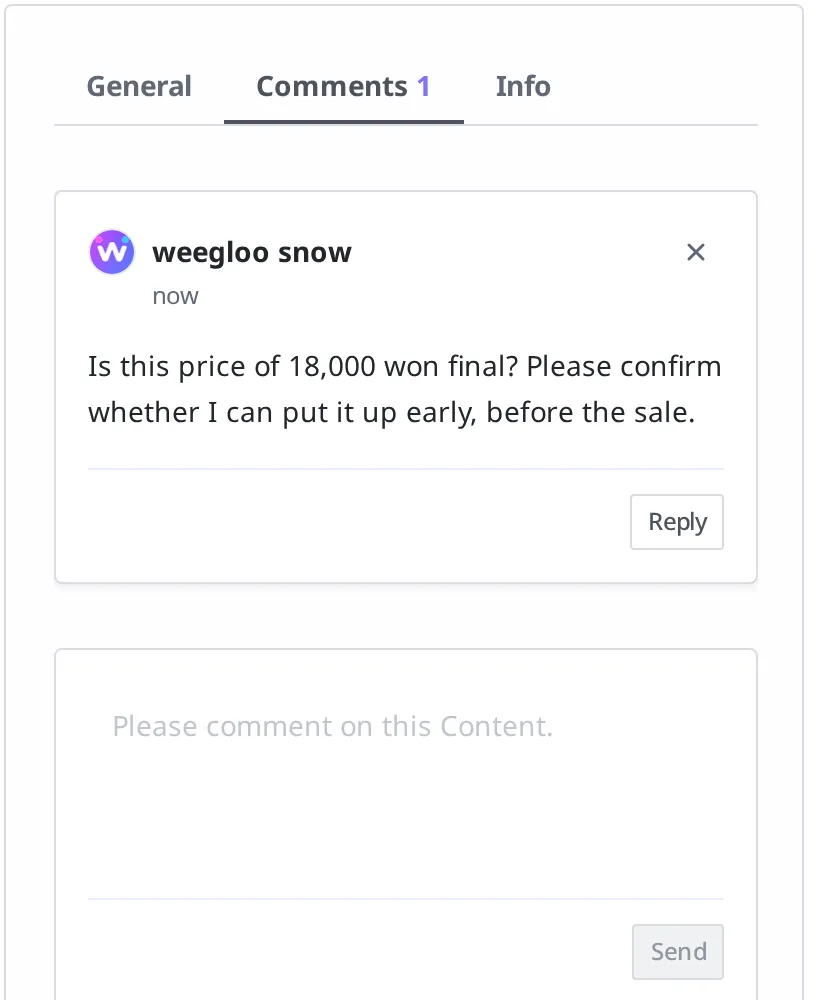
Now you will leave one comment on the "Stainless Tumbler 500ml" product. Say you are writing a note asking your coworker whether the price is final. You leave a comment from within the screen where that product (Content) is open.
- In the Content list, click "Stainless Tumbler 500ml" to open the product screen.
- Click the Comments tab at the top of the right-hand panel.
- In the input field below ("Please comment on this Content."), enter
Is this price of 18,000 won final? Please confirm whether I can put it up early, before the sale.. - Click the Send button.
After you leave it, the author's name and the time of writing are shown together below the text you entered.
Comments are attached to photos (Media) and product templates (Content Type) in the same way. On the screen where that photo or template is open, find the Comments tab and leave a note the same way. How to upload photos is covered in Media.
Replying to a comment
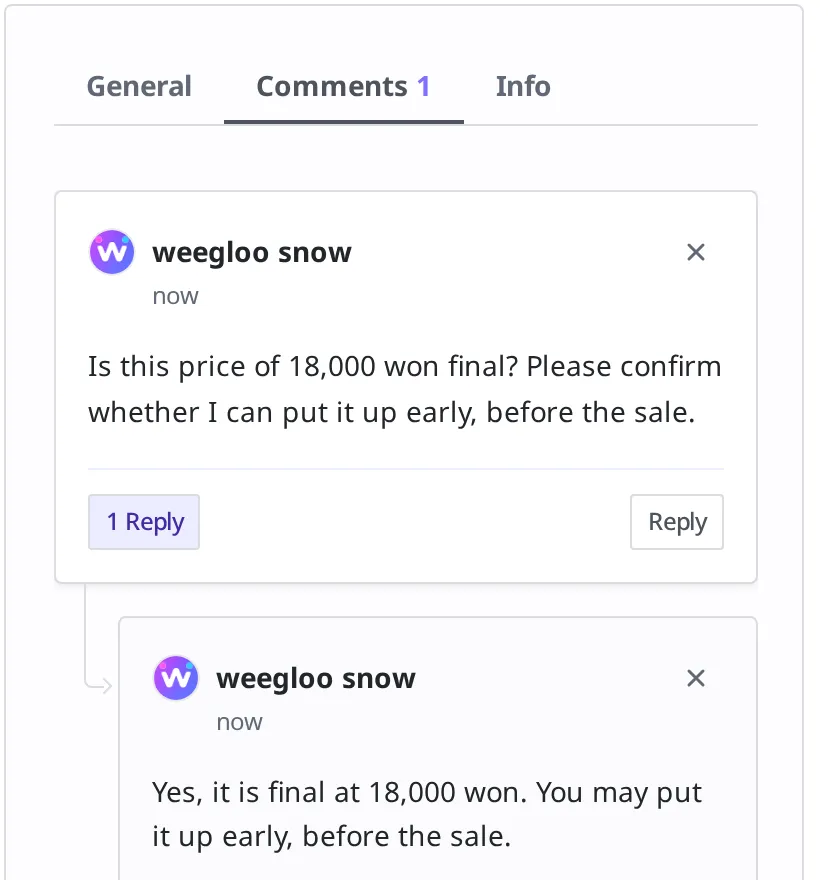
When you answer a question a coworker left, you reply to that comment. A reply is shown grouped under the original comment, so it is clear at a glance which question it answers. Here you will reply to the "Is this price final?" comment left earlier.
- Click the Reply button at the bottom right of the comment card you want to reply to.
- In the reply input field, enter
Yes, it is final at 18,000 won. You may put it up early, before the sale.. - Click the Send button.
When you leave the reply, it is shown grouped right under the original comment.
What to know after leaving a comment
You can edit and delete comments you wrote yourself. To change or delete the content of a comment you left on the tumbler, the person who wrote that comment does it directly. You cannot edit or delete the content of a comment someone else left. So each person manages and is responsible only for the notes they left themselves.
If you delete a comment, the replies under it disappear with it. If you delete the comment "Is this price final?", the reply "Yes, it is final" attached to it also disappears with it. Because a reply is grouped under the original comment, when the comment that is the root of the group disappears, the reply is cleared along with it. If you want to keep only the reply, it is best not to delete the original comment.
What to do next
- Writing and Publishing Content: Covers how to create and publish the product (Content) you will leave comments on.
- Tag: Covers the classification label that is attached to the same product but plays a different role.
- API Reference: Covers technical specifications such as the request format you need when leaving and fetching comments directly in code.